
Download Texefex – Text Gradient, Color Gradient, Document Design, Email Formatting, Web Content
Overview
Texefex is a productivity-focused mobile application designed to elevate the visual quality of digital text across documents, emails, and web content. The app enables users to apply multi-color gradients to text, transforming plain written content into visually engaging elements. This functionality is particularly useful for individuals who prioritize aesthetic presentation in their digital communications, such as content creators, marketers, and professionals preparing reports or presentations. By offering a simple interface for gradient application, Texefex addresses the common challenge of making written content stand out in a visually saturated digital environment.
Developed by Thomas P. Larson, Texefex has been available since 2012, indicating a long-standing presence in the mobile productivity space. Although the developer did not provide additional background on their professional history or other projects, the app’s enduring relevance suggests a stable and functional design. Real-world use cases include enhancing email subject lines, adding visual flair to blog posts or social media captions, and improving the layout of digital documents for client delivery. In the broader app ecosystem, Texefex fills a niche for lightweight, specialized tools that focus on text aesthetics without requiring complex design software.
Key Features & Functionality
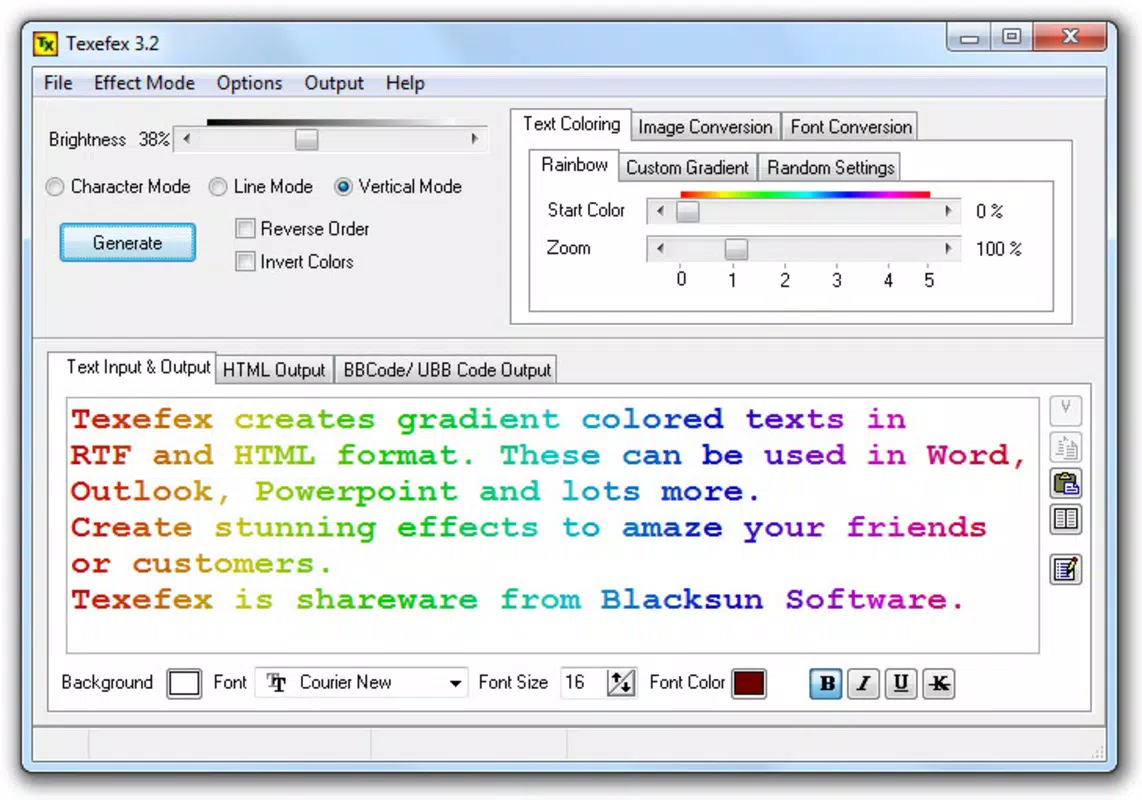
- Multi-Color Gradients (up to 8 colors): Users can apply gradients with up to eight distinct colors, enabling vibrant and dynamic text effects. This feature supports both bold, eye-catching visuals and subtle, refined transitions depending on user preference.
- Customizable Text Options: The app allows selection of fonts, sizes, and styles, enabling precise control over the appearance of the text. This level of personalization supports branding consistency and individual expression.
- Preview Feature in HTML: Before finalizing, users can preview their formatted text in HTML format, ensuring compatibility and visual accuracy across different platforms and devices.
- Easy Export in RTF and HTML: Once satisfied, users can export their designs in RTF or HTML formats, facilitating seamless integration into emails, websites, or other documents without additional formatting steps.
For example, a marketing professional might use Texefex to create a gradient-laden email headline that stands out in a crowded inbox. A freelance writer could apply a soft gradient to a blog title to improve visual appeal. The preview and export features ensure that the final output matches expectations and functions correctly in the intended environment.
Interface, UX & Performance
Texefex features a clean, minimal interface focused on core functionality—applying gradients to text. The layout is intuitive, with clearly labeled controls for color selection, font adjustment, and export options. Navigation flows logically from input to preview to export, minimizing user friction. The app’s design prioritizes efficiency, allowing users to make changes and see results in real time.
Although the developer did not list formal performance metrics, the app’s lightweight size of 2.8MB suggests optimized resource usage. It is likely to run smoothly on a wide range of Android devices, including older models. Responsiveness appears consistent based on the app’s long-term availability. Stability is implied by its continued presence in the ecosystem since 2012, though no recent updates have been documented. Users can expect a reliable experience for basic text formatting tasks without system strain.
Platform Compatibility & Technical Requirements
Texefex is available on the Android platform and supports Android devices with the specified software version. The app has a file size of 2.8MB, which is compact and suitable for devices with limited storage. The developer did not specify minimum OS requirements or hardware specifications, so compatibility with newer Android versions cannot be confirmed. However, the app’s long-standing release date suggests it may function on older Android systems. Users should verify compatibility with their device’s operating system before installation.
Pros and Cons
Pros
- Lightweight at just 2.8MB, ideal for devices with limited storage.
- Free to download and use, with no in-app purchases or subscriptions.
- Supports up to 8-color gradients for rich, dynamic text effects.
- Offers export in both RTF and HTML formats for versatile integration.
- Includes a real-time preview feature to ensure accurate visual output.
Cons
- Developer did not provide information on minimum OS requirements.
- No recent update history available, raising concerns about long-term support.
- Platform availability limited to Android; no iOS or other OS support confirmed.
- Interface is minimal, which may limit advanced customization for power users.
- Specific font library or style options were not disclosed.
FAQ
Is Texefex safe to download and install?
Yes, Texefex is a free Android app developed by Thomas P. Larson. It does not require excessive permissions and has a small file size, reducing the risk of malicious content. As with any app, users should download from trusted sources.
Can I use Texefex on iOS devices?
The developer did not list iOS compatibility. The app is currently available only on Android, and there is no confirmed version for iOS or other platforms.
What file formats does Texefex support for export?
Texefex allows users to export their formatted text in RTF and HTML formats, making it easy to use in emails, websites, and document editors.
Does Texefex require an internet connection?
No, Texefex functions entirely offline. All features, including gradient application, preview, and export, are available without an internet connection.
How often is Texefex updated?
The developer did not provide update history. The last known release was in 2012, and no recent updates have been documented.
Final Thoughts
Texefex remains a niche yet valuable tool for users seeking to enhance the visual appeal of their digital text. Its focus on color gradients, customizable text options, and straightforward export workflows makes it a practical choice for professionals and creatives who value aesthetics in communication. While the app lacks modern updates and platform diversity, its lightweight design and free access continue to offer tangible benefits. For those working on Android devices and needing a simple way to apply gradient text to emails, documents, or web content, Texefex delivers a reliable, no-frills solution. Its enduring presence in the app market speaks to its core functionality and user utility.
Download Texefex now


